We Compared 4 Portable Power Stations for Laptops

Off-grid power editor
Published
Updated
Last fact-checked
This guide is for people who need a laptop, and usually the kit around it, to keep working away from a wall socket. A laptop is a low-draw device with its own battery, which makes almost every specification these units are marketed on irrelevant. We compared four on the ones that are not: USB-C Power Delivery wattage, delivered watt-hours after conversion loss, recharge time and weight. We did not test these units, and every review states exactly what its recommendation rests on. What you get here is the arithmetic the listings skip. How many times each pack refills a laptop battery. How many hours of work it adds. What a watt-hour costs you in pounds carried. And why the inverter rating on the box is the wrong number to shop on for a machine that draws 30W.
What is the best portable power station for a laptop?
The OUPES Mega 1 suits the widest range of laptop users. Two 100W USB-C PD ports charge two machines at full rate without the inverter in the path, 1024Wh covers a long working day, and it refills to 80% in 36 minutes. If you need to carry the unit rather than park it, the Jackery Explorer 300 does the same job at a quarter of the weight.
Key takeaways
- USB-C Power Delivery wattage decides how fast a laptop charges; the inverter rating on the box decides almost nothing for a 30W machine
- Charging over USB-C loses roughly 8 per cent, against roughly 15 per cent through the inverter, so the same pack goes further on the right cable
- Capacity per pound only ranges from 30.6 to 41.1 watt-hours across this shortlist, so extra capacity is bought with weight almost linearly
- A laptop already has a battery, so during a power cut the things worth protecting are the monitor, dock, drive and router around it
- Recharge time matters more than headline capacity if you work in blocks with sockets available between them
Our picks at a glance
Every unit below wins a specific situation rather than a place in a ranking. Pick the row that matches how you will actually use it.
-
Best for running two laptops on USB-C

OUPES Mega 1
Two-person remote setups, or one person running a laptop plus a monitor and camera gear, who can leave the unit in a vehicle or under a desk rather than carry it.
-
Best for carrying in a backpack

Jackery Explorer 300
Students, commuters and travelling workers who want a full working day of laptop top-ups in a bag they already carry, rather than backup for a whole desk.
-
Best for a full desk with a monitor
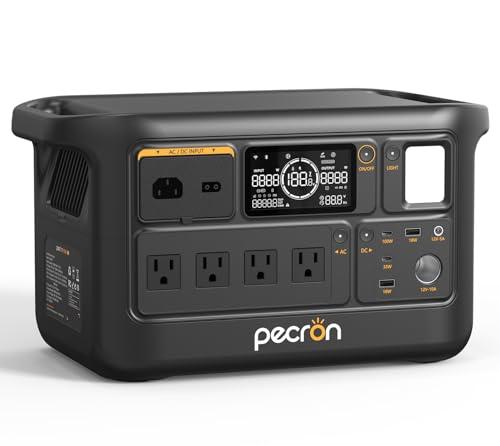
Pecron F1000LFP
Home offices and long stays where a laptop, an external monitor and networking kit all have to keep running, with solar as a realistic way to refill between days.
-
Best for outage cover at a home desk

BLUETTI Elite 30 V2
Home-office desks on an unreliable supply, where the laptop looks after itself and the monitor, dock, drive and router need to survive short interruptions without a reset.
How they compare
Scroll the table sideways to see every column.
| Product | Where to buy | Award | Capacity | Weight | Ports | AC output | AC recharge time | UPS switchover | Warranty | Best for |
|---|---|---|---|---|---|---|---|---|---|---|
| OUPES Mega 1 | Best for running two laptops on USB-C | 1024Wh | 27.8 lb (12.6 kg) | 2x USB-C 100W PD, 4x USB-A QC3.0, 12V DC outputs, AC outlets | 2000W (4500W surge) | 36 minutes to 80% on AC, 26 minutes with AC and solar together | Under 20ms | 5-year warranty | Two-person remote setups, or one person running a laptop plus a monitor and camera gear, who can leave the unit in a vehicle or under a desk rather than carry it. | |
| Jackery Explorer 300 | Best for carrying in a backpack | 292Wh | 7.1 lb (3.2 kg) | 6 total, 2 AC outlets, 1 USB-C PD 100W, 2 USB-A, 1 car port 120W | 300W (600W peak surge) | -- | -- | 2 year manufacturer | Students, commuters and travelling workers who want a full working day of laptop top-ups in a bag they already carry, rather than backup for a whole desk. | |
| Pecron F1000LFP | Best for a full desk with a monitor | 960Wh | 23.9 lb (10.8 kg) | 10 total, 4 AC outlets, 2x USB-A 18W, 1x USB-C 33W, 1x USB-C 100W, DC 5525, car port | 1500W pure sine wave | 50 minutes to 80%, 70 minutes to full at 1000W AC | Within 20ms | 2+3 years | Home offices and long stays where a laptop, an external monitor and networking kit all have to keep running, with solar as a realistic way to refill between days. | |
| BLUETTI Elite 30 V2 | Best for outage cover at a home desk | 288Wh | 9.4 lb (4.3 kg) | -- | 600W continuous (1500W Power Lifting) | 0-80% in 45 minutes, 0-100% in 70 minutes (380W AC) | 10ms | 60 months | Home-office desks on an unreliable supply, where the laptop looks after itself and the monitor, dock, drive and router need to survive short interruptions without a reset. |
The full reviews
Best for running two laptops on USB-C
OUPES Mega 1
OUPES
Two 100W USB-C PD ports on one 1024Wh pack is the specification that decides this category, because it lets two people work all day without the inverter ever switching on. The trade-off is 27.8 lb of unit built around a 2000W inverter that a laptop user will almost never call on.
What we like about the OUPES Mega 1
- Two 100W USB-C PD outputs mean two laptops charge at full negotiated rate from one pack, with no inverter in the path
- 36 minutes to 80% is roughly 819Wh taken on in 0.6 hours, so a lunch break refills most of the pack
- Under 20ms switchover keeps a monitor, dock and desk router alive when the wall supply drops
- The 3,500-cycle rating works out at about 3,584kWh of lifetime throughput, which two laptops drawing 250Wh a day would take decades to reach
Where it falls short for the OUPES Mega 1
- At 27.8 lb for 1024Wh it delivers 36.8 watt-hours per pound, below the Jackery Explorer 300 at 41.1 and the Pecron F1000LFP at 40.2, so it is a car-boot unit rather than a bag unit
- The recharge spec quotes 26 minutes with AC and solar together but publishes no solar input wattage, so an off-grid refill cannot be planned the way the Pecron F1000LFP's stated 600W ceiling can
- Refilling at the 36-minute rate pulls roughly 1,365W, about 11.4A at 120V, which is most of a 15A household circuit and will trip a shared one
- The published port list names AC outlets without giving a count, so you cannot confirm how many mains devices you can plug in before buying
Key specifications
- Capacity
- 1024Wh
- Weight
- 27.8 lb (12.6 kg)
- Ports
- 2x USB-C 100W PD, 4x USB-A QC3.0, 12V DC outputs, AC outlets
- AC output
- 2000W (4500W surge)
- AC recharge time
- 36 minutes to 80% on AC, 26 minutes with AC and solar together
- UPS switchover
- Under 20ms
- Rated cycle life
- 3,500+ cycles to 80%
- Expandable
- Yes, to 5120Wh with two B2 extra batteries
Most guides in this category shop on inverter wattage. For a laptop that is the wrong number, and the Mega 1 is the clearest example of why.
The ports are the product
A laptop charger negotiates a USB-C Power Delivery profile and takes DC straight from the pack. Nothing is converted to 120V AC and back down again. Two 100W PD outputs therefore let two machines charge at their full negotiated rate while the 2000W inverter sits idle.
Assume 92% is delivered through the USB-C path and 1024Wh becomes roughly 942Wh reaching the laptops. Against a pair of ultraportables averaging 30W each, that is about 15 and a half hours of two people working. One machine alone stretches past 30 hours. Put the same energy through the inverter at 85% and you get 870Wh instead, a loss of about 72Wh, which is more than a full ultraportable battery charge given away for nothing.
What the fast refill is really for
36 minutes to 80% means the pack takes on roughly 819Wh in 0.6 hours, an average intake near 1,365W. That is a genuine advantage when you are working out of a café or a hotel room and only have the length of a meeting to plug in.
It also has a practical catch. 1,365W at 120V is about 11.4A. On a 15A circuit shared with a kettle or a heater, that is a tripped breaker. If you plan to use the fast rate regularly, give it a circuit of its own.
Where the weight lands
1024Wh in a 27.8 lb box is 36.8 watt-hours per pound. The Jackery Explorer 300 delivers 41.1 and the Pecron F1000LFP 40.2, so only the BLUETTI Elite 30 V2 is worse to carry per watt-hour, at 30.6. You are carrying the mass of an inverter built for power tools in order to get a pair of USB-C ports.
That is a fair trade if the unit lives in a car, a van or under a desk and only moves occasionally. It is a bad trade if you were hoping to walk anywhere with it. The 15.1 x 9.1 x 11.6 in footprint settles the question on its own.
Who should choose something else
If your entire load is one laptop and a phone, the arithmetic says you will never reach the bottom of 1024Wh in a working day, and the Jackery Explorer 300 does the same job at a quarter of the weight. If you need four mains outlets for a monitor, a dock and a desk lamp, the Pecron F1000LFP names its AC outlet count and this one does not.
- Best for
- Two-person remote setups, or one person running a laptop plus a monitor and camera gear, who can leave the unit in a vehicle or under a desk rather than carry it.
- Choose something else if
- You want something you can put in a backpack, or your whole load is a single ultraportable laptop that never comes close to needing 1024Wh.
Best for carrying in a backpack
Jackery Explorer 300
Jackery
This is the only unit here that a person will actually carry every day, and it still has a full 100W USB-C PD port. 292Wh at 7.1 lb is the highest capacity per pound on the shortlist, bought at the cost of a spec sheet that leaves the recharge time unstated.
What we like about the Jackery Explorer 300
- A 100W USB-C PD port charges a laptop at full negotiated rate without touching the inverter
- 41.1 watt-hours per pound is the best ratio in this guide, so the capacity costs the least to carry
- The 9.1 x 5.2 x 7.8 in body is roughly 369 cubic inches, under a quarter of the BLUETTI Elite 30 V2's 1,625 for four watt-hours more capacity
- Rated for over 4,000 cycles to 70%, which at three full discharges a week is more than two decades of pack life
Where it falls short for the Jackery Explorer 300
- The specification sheet publishes no AC recharge time, so you cannot plan a refill around a lunch break or a two-hour meeting the way you can with the other three units here
- 292Wh delivers about 269Wh over USB-C, which is roughly three hours for a 90W workstation laptop rather than a working day
- The 2-year warranty is the shortest flat term here, against 5 years on the OUPES Mega 1, 60 months on the BLUETTI Elite 30 V2 and 2+3 years on the Pecron F1000LFP
- Six ports and two AC outlets is a thin panel once a laptop, a phone and a monitor are all connected
Key specifications
- Capacity
- 292Wh
- Weight
- 7.1 lb (3.2 kg)
- Ports
- 6 total, 2 AC outlets, 1 USB-C PD 100W, 2 USB-A, 1 car port 120W
- AC output
- 300W (600W peak surge)
- Rated cycle life
- Over 4,000 cycles to 70%
- Dimensions
- 9.1 x 5.2 x 7.8 in
- Warranty
- 2 year manufacturer
Every other unit in this guide is something you put down somewhere and leave. This is the one you pick up.
Why the weight ratio decides it
292Wh in 7.1 lb works out at 41.1 watt-hours per pound. The Pecron F1000LFP manages 40.2, the OUPES Mega 1 36.8 and the BLUETTI Elite 30 V2 only 30.6. In a category where capacity is supposed to cost weight almost linearly, the smallest unit here is also the most efficient one to carry.
Volume tells the same story more bluntly. At 9.1 x 5.2 x 7.8 in this occupies roughly 369 cubic inches. The BLUETTI Elite 30 V2, with four watt-hours less capacity, occupies about 1,625. One of those fits in a backpack.
What 292Wh actually does for a laptop
Take 8% off for the USB-C path and roughly 269Wh reaches the machine.
- A 60Wh ultraportable battery: about four and a half full refills
- A 13 to 14 inch laptop averaging 30W: close to nine hours of working time
- A 16 inch workstation averaging 90W: about three hours
That first line is the useful one. Four full battery refills covers a day of travel, a long flight followed by an afternoon of work, or a weekend away with a phone charging alongside. It does not cover a workstation laptop running a build or an export.
The gap in the sheet
Jackery publishes cycle life, dimensions, port detail and weight for this unit, but no AC recharge time. That matters more than it sounds. The whole case for the OUPES Mega 1 and the BLUETTI Elite 30 V2 is that you can refill them inside a known window. Here you are buying without that number, and if your pattern is drain-refill-drain across a working day, that is a real reason to look at one of the others instead.
Who should choose something else
Anyone powering a monitor and a dock as well as a laptop. Two AC outlets and a 300W inverter will run that combination, but 269Wh delivered will not run it for long enough to matter. Once your load is a desk rather than a machine, the question becomes capacity, and this unit was never the answer to that.
- Best for
- Students, commuters and travelling workers who want a full working day of laptop top-ups in a bag they already carry, rather than backup for a whole desk.
- Choose something else if
- You run a 90W-class workstation laptop for long stretches, or you need to know exactly how long a refill takes before you commit to buying.
Best for a full desk with a monitor
Pecron F1000LFP
Pecron
Four AC outlets, a 100W USB-C port and 960Wh is the combination that keeps a whole desk running rather than one machine. It is also the only unit here that publishes a solar input at all, at 600W, which is what turns a long stay somewhere without a reliable socket into a workable arrangement.
What we like about the Pecron F1000LFP
- Ten ports including four AC outlets covers a laptop, a monitor, a dock, a router and a desk lamp at once
- 40.2 watt-hours per pound is close to the 41.1 of the lightest unit here despite carrying more than three times the capacity
- 600W solar input can refill the 960Wh pack in about 1.6 hours at the full rating, and it is the only published solar input on this shortlist
- Switchover within 20ms holds a monitor and dock through a mains drop, so a docked laptop does not lose its displays
Where it falls short for the Pecron F1000LFP
- The second USB-C port is 33W, below the 45W and 65W PD profiles most laptop chargers negotiate, so only one machine here can charge at laptop speed over USB-C
- No cycle life is published on the specification we compared, so pack longevity cannot be checked against the OUPES Mega 1 3,500-cycle rating before you buy
- At 23.9 lb and 15.0 x 8.5 x 8.4 in it is a two-hand carry that belongs on a floor or a shelf, not in a bag
- Switchover is published as within 20ms rather than a figure inside the 16.7ms of one 60Hz cycle, so gear fussier than a monitor can still see a gap the BLUETTI Elite 30 V2 closes at 10ms
Key specifications
- Capacity
- 960Wh
- Weight
- 23.9 lb (10.8 kg)
- Ports
- 10 total, 4 AC outlets, 2x USB-A 18W, 1x USB-C 33W, 1x USB-C 100W, DC 5525, car port
- AC output
- 1500W pure sine wave
- AC recharge time
- 50 minutes to 80%, 70 minutes to full at 1000W AC
- UPS switchover
- Within 20ms
- Max solar input
- 600W
- Warranty
- 2+3 years
The other three units in this guide answer the question “how do I keep a laptop alive”. This one answers “how do I keep a desk alive”, and the port panel is why.
Ten ports is the argument
Four AC outlets, two USB-A at 18W, one USB-C at 33W, one USB-C at 100W, a DC5525 and a car port. A laptop takes the 100W USB-C. A 27 inch monitor, a dock and a router take three of the AC outlets. Nothing has to be unplugged so something else can run, which is the failure mode of every two-outlet unit.
Assume that desk averages 75W. Take 15% off the 960Wh rating for the inverter and roughly 816Wh reaches the equipment, which is about eleven hours. That is a working day with a margin, not a top-up.
Move the laptop off the inverter
There is a small, free saving most people miss. Over an eleven-hour day, a 30W laptop consumes about 330Wh at the socket. Delivered through the inverter at 85% that costs the pack roughly 388Wh. Delivered through the 100W USB-C port at 92% it costs about 359Wh.
The 29Wh difference is around twenty extra minutes of desk time, every single day, for the effort of using a different cable.
The second USB-C port does not extend that trick. At 33W it sits below the 45W and 65W profiles most laptop chargers negotiate, so a second machine either charges slowly or goes on an AC outlet and pays the conversion loss.
What the solar input changes
600W is the only solar ceiling published for any unit here. Against a 960Wh pack that is a full refill in about 1.6 hours at the rated figure, or closer to 2.3 hours if your panels deliver the 70% of nameplate that is more typical in real sun.
That is the specification that makes a long stay somewhere without dependable mains actually workable, because you are refilling faster than a normal working day drains the pack.
Who should choose something else
Anyone who needs two laptops on USB-C at full rate should take the OUPES Mega 1 and its pair of 100W ports. Anyone whose real requirement is walking somewhere with a battery should take the Jackery Explorer 300, because 23.9 lb does not travel by hand for any useful distance.
- Best for
- Home offices and long stays where a laptop, an external monitor and networking kit all have to keep running, with solar as a realistic way to refill between days.
- Choose something else if
- You need two laptops charging over USB-C at once, or you want published cycle life before committing to a unit you intend to drain every working day.
Best for outage cover at a home desk
BLUETTI Elite 30 V2
BLUETTI
A laptop already has a battery, so the thing worth protecting during a cut is everything plugged in around it. A 10ms switchover is shorter than one mains cycle, and that is the reason to put this small pack under a desk rather than in a bag.
What we like about the BLUETTI Elite 30 V2
- 10ms switchover is under one full 60Hz cycle of 16.7ms, so a monitor, dock and desktop drive do not reset when mains drops
- 600W continuous handles a laptop, a large monitor and a desk lamp together with headroom left
- 45 minutes to 80% is about 230Wh taken on at an average 307W, so it is ready again well inside a working morning
- A 60-month warranty matches the longest cover here, level with the 5 years on the OUPES Mega 1 and against 2 years on the Jackery Explorer 300
Where it falls short for the BLUETTI Elite 30 V2
- The published dimensions of 12.5 x 13.4 x 9.7 in work out at roughly 1,625 cubic inches, about four and a half times the volume of the Jackery Explorer 300 for four watt-hours less capacity
- The specification we compared does not itemise the port panel, so USB-C Power Delivery wattage is unconfirmed, and for a laptop buyer that is the single most important number
- 30.6 watt-hours per pound is the worst carry ratio here, so the small capacity does not translate into a small load
- 288Wh through the inverter is about 245Wh delivered, roughly three and a quarter hours for a 75W desk, which covers a cut rather than a working day
Key specifications
- Capacity
- 288Wh
- Weight
- 9.4 lb (4.3 kg)
- AC output
- 600W continuous (1500W Power Lifting)
- AC recharge time
- 0-80% in 45 minutes, 0-100% in 70 minutes (380W AC)
- UPS switchover
- 10ms
- Dimensions
- 12.5 x 13.4 x 9.7 in
- Warranty
- 60 months
Buying a power station for a laptop misses half the problem. The laptop is the one device on the desk that already has a battery.
What actually goes dark
When mains drops, the machine keeps running and everything else stops. External monitors blank. A docking station drops its USB devices. A spinning external drive parks mid-write. A desk router reboots and takes two minutes to come back. The laptop survives and the working session does not.
A 10ms switchover is shorter than one full cycle of 60Hz mains, which lasts 16.7ms. Equipment on the other side of that switch never sees a gap long enough to reset. That is the whole reason this unit belongs in a laptop guide despite being the smallest pack here.
The runtime is honest, not generous
288Wh through the inverter at 85% leaves roughly 245Wh. Against a desk drawing 75W for a monitor, a dock and networking, that is about three and a quarter hours. A laptop alone on the same path stretches to around eight.
Three hours is not a working day and it was never meant to be. It is enough to carry a desk through a cut, finish what you were doing and shut down properly. Refilling takes 45 minutes to 80%, or roughly 230Wh at an average intake near 307W, which fits inside a coffee break.
Where it falls down
The published dimensions are the problem. 12.5 x 13.4 x 9.7 in is about 1,625 cubic inches for 288Wh. The Jackery Explorer 300 holds 292Wh in roughly 369. At 9.4 lb the ratio is 30.6 watt-hours per pound, the worst here.
There is also a gap in the sheet. BLUETTI publishes capacity, output, switchover and recharge times, but no itemised port list, so the USB-C Power Delivery wattage is unconfirmed. If your plan is to charge a laptop directly over USB-C rather than through an AC outlet, buy something that states the number.
Who should choose something else
Anyone who wants this unit’s job done for a longer stretch should take the Pecron F1000LFP, which switches over within 20ms and holds more than three times the energy. Anyone buying to travel should not be looking at this class at all.
- Best for
- Home-office desks on an unreliable supply, where the laptop looks after itself and the monitor, dock, drive and router need to survive short interruptions without a reset.
- Choose something else if
- You are buying for travel, or you need a confirmed USB-C Power Delivery wattage before you will trust a unit to charge a laptop directly.
How we researched this guide
Four units were compared using published manufacturer specifications and aggregated owner reports. None were tested by us. Delivered-energy figures are calculated from rated capacity using a stated 92 per cent USB-C conversion assumption and a stated 85 per cent inverter assumption, applied identically to every unit, and every review names the sources and limits behind its placement.
The full process is on our how we test portable power stations page, including what counts as hands-on use.
- Units evaluated
- 4
- Used hands-on
- 0
- Assessed from documentation and owner reports
- 4
Evaluation methods used: specification comparison
Which one should you buy?
Match your situation on the left to the recommendation on the right.
-
Two people need to work from one battery all day
Recommendation: Buy the OUPES Mega 1 for its pair of 100W USB-C PD ports
-
You will carry the unit in a bag most days
Recommendation: Buy the Jackery Explorer 300 at 7.1 lb, the best watt-hours per pound here
-
You run an external monitor, a dock and a router alongside the laptop
Recommendation: Buy the Pecron F1000LFP for its four AC outlets and 960Wh
-
You want to refill mostly from solar during a long stay
Recommendation: Buy the Pecron F1000LFP for its 600W solar input
-
Your mains supply drops briefly and you only need the desk to survive it
Recommendation: Buy the BLUETTI Elite 30 V2 for its 10ms switchover
-
You only ever have short windows at a socket between work sessions
Recommendation: Buy the OUPES Mega 1, which reaches 80% in 36 minutes
Mistakes buyers make
- Shopping on inverter wattage for a laptop, which is a 30W to 90W load that will never approach a 1500W or 2000W rating
- Plugging the laptop's own charger into an AC outlet when the unit has a 100W USB-C port, and paying the conversion loss for nothing
- Reading rated watt-hours as delivered watt-hours, when 10 to 15 per cent never reaches the device
- Buying capacity for a monitor and dock, then discovering the unit only has two AC outlets
- Assuming any USB-C port will charge a laptop, when a 33W port sits below the profiles most laptop chargers negotiate
- Using the fastest AC recharge rate on a shared 15A circuit and tripping the breaker mid-session
Our final recommendation
If you want one answer rather than a shortlist, this is the unit that suits the widest range of readers in this category.
Best for running two laptops on USB-C
Two-person remote setups, or one person running a laptop plus a monitor and camera gear, who can leave the unit in a vehicle or under a desk rather than carry it.
Questions buyers ask
How many times will a power station charge my laptop?
Divide delivered watt-hours by your laptop's battery capacity. A typical ultraportable battery holds about 60Wh, so the 292Wh Jackery Explorer 300 gives roughly four and a half full refills after conversion loss, and the 1024Wh OUPES Mega 1 gives about fifteen and a half. Check your own battery rating, because a 16 inch workstation can hold half as many again.
Do I need an inverter to charge a laptop?
No, if the unit has a USB-C Power Delivery port rated at or above what your charger negotiates, usually 45W, 65W or 100W. The laptop takes DC directly and nothing is converted to 120V AC and back. That path is the reason inverter wattage barely matters when the only load is a laptop.
Is a power station better than a big USB-C power bank?
For a laptop alone, a power bank is lighter and often enough. A power station earns its weight when other things need mains power too, such as a monitor, a dock, a printer or a router, or when you want switchover protection so those devices do not reset during a cut.
Will one of these keep my monitor running through a power cut?
Yes, if it has a UPS switchover fast enough that the monitor never sees a gap. The BLUETTI Elite 30 V2 switches in 10ms, which is shorter than one 16.7ms cycle of 60Hz mains. The Pecron F1000LFP and the OUPES Mega 1 both switch within 20ms, which is fast enough for most desk equipment.
Can I use one of these on an aircraft?
No. Every unit in this guide is far beyond the lithium battery capacity airlines permit in a cabin, and none may travel in hold luggage either. These are for cars, desks, cabins and hotel rooms, not for flights.
About the author