We Compared 4 Portable Power Stations for Charging Drone Batteries

Off-grid power editor
Published
Updated
Last fact-checked
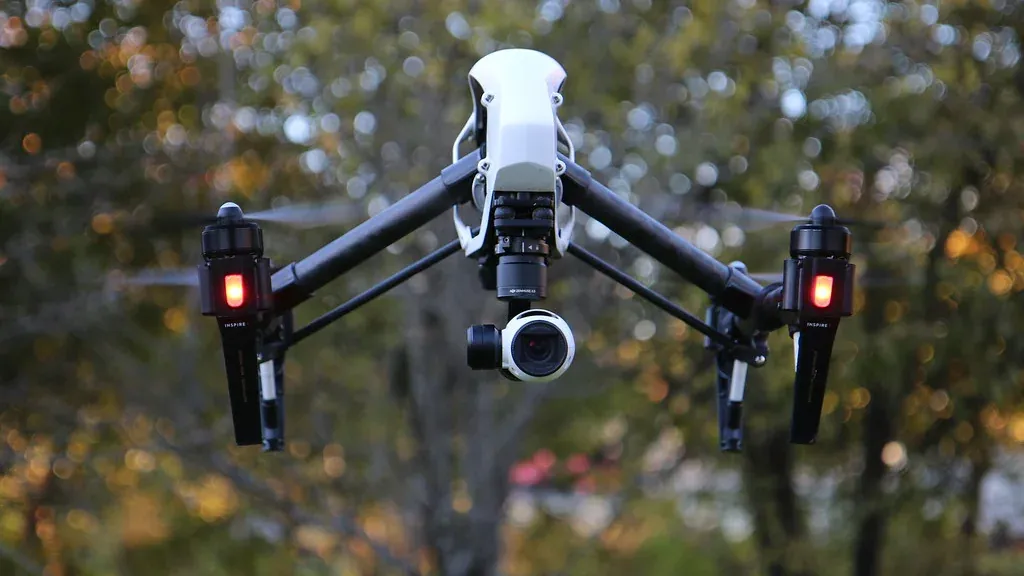
This guide is for pilots who run out of flight batteries before they run out of daylight: hobbyists on weekend trips, property and event shooters moving between sites, and mapping crews on all-day jobs. We compared four units on the four things that decide field charging: USB-C port wattage and count, inverter output for multi-battery hub chargers, how fast the station itself refills, and how much energy it carries for each pound of weight. None of these units were tested by us, and every review states exactly what its recommendation rests on. What you get here is the arithmetic a retailer listing leaves out, namely how many flight packs each capacity actually covers once conversion loss is counted, and a clear line between the units that live in a vehicle and the one that fits in a backpack.
What is the best portable power station for drones?
The OUPES Mega 1 suits most pilots. It holds about 14 mid-size flight packs, charges two of them at once through a pair of 100W USB-C ports, and refills to 80% in 36 minutes, so a drive between sites resets it. If you walk to your launch point, the 7.1 lb Jackery Explorer 300 is the only unit here that goes in a backpack.
Key takeaways
- A mid-size flight pack holds roughly 60Wh and costs about 70Wh from the station once conversion loss is counted, so divide capacity by 70 to get a flight count
- USB-C port wattage and port count decide how fast a set of packs charges; total capacity only decides how many charges you get before the station is flat
- Watt-hours per pound varies from 28 to 41 across this shortlist, which decides what you can carry rather than what you can charge
- The station's own recharge time is the specification that turns a two-site day into a four-site day
- Sub-250g drones change every calculation, because their packs draw roughly a third of what a mid-size pack does
Our picks at a glance
Every unit below wins a specific situation rather than a place in a ranking. Pick the row that matches how you will actually use it.
-
Best for fast turnaround between sites

OUPES Mega 1
Commercial pilots covering several properties or sites in one day who can plug in at a vehicle or a client's outlet for half an hour between shoots.
-
Best for two-pilot crews working out of a vehicle
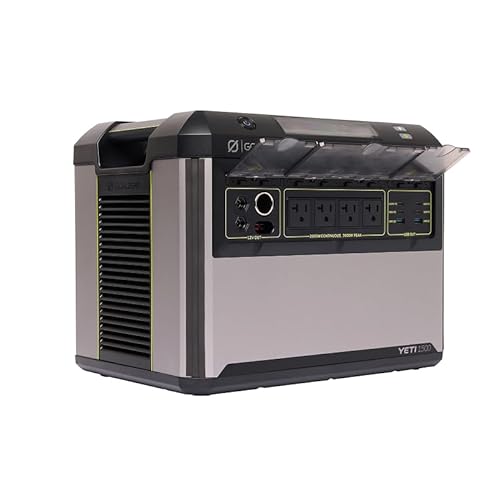
Goal Zero Yeti 1500 (6th Gen)
Two-pilot crews and mapping teams working out of a vehicle, where one station has to keep several sets of packs, radios and laptops topped up all day.
-
Best for solar recharging on multi-day shoots
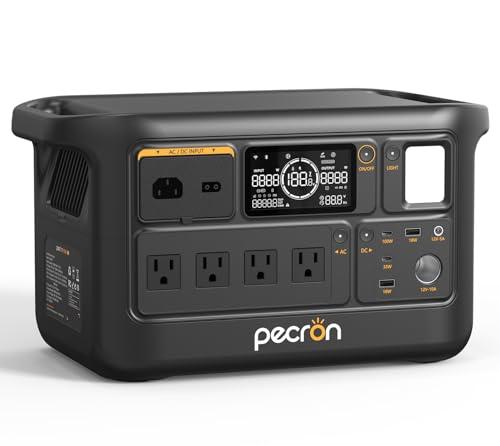
Pecron F1000LFP
Mapping, survey and expedition pilots spending several days away from mains power who can put panels out while they fly and fly again on solar energy.
-
Best for hike-in launch points

Jackery Explorer 300
Pilots walking to ridge lines, coastlines and trailheads who need two or three extra flights rather than a full day of charging at the car.
How they compare
Scroll the table sideways to see every column.
| Product | Where to buy | Award | Capacity | AC output | Ports | AC recharge time | Weight | Dimensions | Best for |
|---|---|---|---|---|---|---|---|---|---|
| OUPES Mega 1 | Best for fast turnaround between sites | 1024Wh | 2000W (4500W surge) | 2x USB-C 100W PD, 4x USB-A QC3.0, 12V DC outputs, AC outlets | 36 minutes to 80% on AC, 26 minutes with AC and solar together | 27.8 lb (12.6 kg) | 15.1 x 9.1 x 11.6 in | Commercial pilots covering several properties or sites in one day who can plug in at a vehicle or a client's outlet for half an hour between shoots. | |
| Goal Zero Yeti 1500 (6th Gen) | Best for two-pilot crews working out of a vehicle | 1505Wh | 2000W (3600W surge) | 4 AC outlets, 6 USB outlets (including a 140W USB-C), 12V vehicle outlet, HPP output, 2 x 6mm outlets | Under 1 hour from 0% to 80% from the wall | 52.9 lb (24.0 kg) | 12 x 11.38 x 15.75 in | Two-pilot crews and mapping teams working out of a vehicle, where one station has to keep several sets of packs, radios and laptops topped up all day. | |
| Pecron F1000LFP | Best for solar recharging on multi-day shoots | 960Wh | 1500W pure sine wave | 10 total, 4 AC outlets, 2x USB-A 18W, 1x USB-C 33W, 1x USB-C 100W, DC 5525, car port | 50 minutes to 80%, 70 minutes to full at 1000W AC | 23.9 lb (10.8 kg) | 15.0 x 8.5 x 8.4 in | Mapping, survey and expedition pilots spending several days away from mains power who can put panels out while they fly and fly again on solar energy. | |
| Jackery Explorer 300 | Best for hike-in launch points | 292Wh | 300W (600W peak surge) | 6 total, 2 AC outlets, 1 USB-C PD 100W, 2 USB-A, 1 car port 120W | -- | 7.1 lb (3.2 kg) | 9.1 x 5.2 x 7.8 in | Pilots walking to ridge lines, coastlines and trailheads who need two or three extra flights rather than a full day of charging at the car. |
The full reviews
Best for fast turnaround between sites
OUPES Mega 1
OUPES
Pilots who shoot two or three locations in a day lose more flights to a flat power station than to a flat drone. The Mega 1 refills to 80% in 36 minutes, which is shorter than most drives between jobs, and its two 100W USB-C ports keep a pair of packs moving while it does.
What we like about the OUPES Mega 1
- Refills to 80% in 36 minutes, so a lunch stop or a drive between sites is enough to reset the whole kit
- Two 100W USB-C PD ports charge two flight packs simultaneously instead of queueing them
- Four USB-A QC3.0 ports cover controllers, goggles, phones and the tablet without an adapter brick
- 1024Wh is roughly 14 mid-size flight packs, which covers a long commercial day with the laptop still running
Where it falls short for the OUPES Mega 1
- Both USB-C ports stop at 100W, so a 140W-class laptop charger falls back to a slower profile and competes with your packs for the same two sockets
- At 27.8 lb and 15.1 x 9.1 x 11.6 in this is a vehicle-to-tailgate carry, not something you walk to a ridge line with
- 1024Wh over 27.8 lb is 36.8Wh per pound, below the Pecron and well below the Jackery, so you carry more metal for each pack charged
- Rated for 3,500+ cycles to 80%, the shortest design life of the four here against 4,000 on the Yeti 1500 and over 4,000 on the Jackery Explorer 300, which matters on a station charged after every working day
Key specifications
- Capacity
- 1024Wh
- AC output
- 2000W (4500W surge)
- AC recharge time
- 36 minutes to 80% on AC, 26 minutes with AC and solar together
- Ports
- 2x USB-C 100W PD, 4x USB-A QC3.0, 12V DC outputs, AC outlets
- Weight
- 27.8 lb (12.6 kg)
- Rated cycle life
- 3,500+ cycles to 80%
Turnaround, not capacity, is what runs a multi-site shooting day. If you fly two properties before lunch and two after, the question is not whether the station holds enough for sixteen packs. It is whether it can be back near full while you drive.
What 36 minutes actually buys
Charging to 80% means putting roughly 819Wh back into the pack. Doing that in 36 minutes is an average input of about 1,365W, which is why the figure matters rather than the headline number. A 30 to 40 minute drive between sites is enough to reset the station, so the day is limited by your flight packs and your memory cards instead of by stored energy.
Compare that with the Pecron F1000LFP, which takes 50 minutes to reach 80% and 70 to fill. That works out at about 15Wh a minute, so in the same 36-minute window it recovers roughly 553Wh against the Mega 1’s 819Wh. Over a day with two travel windows the gap is about 530Wh, which is another seven to eight flight packs.
Two USB-C ports change the queue
Assume a mid-size folding drone’s flight pack holds about 60Wh, and that charging costs about 15% in conversion loss, so each pack draws around 70Wh from the station.
At 100W a single pack takes a little over half an hour before taper. Charged one at a time through a single port, a four-pack set is a two-and-a-half hour job. On two 100W ports it is half that. Four USB-A QC3.0 ports then run the controller, the goggles and a phone at the same time, so nothing waits.
Where the capacity lands
1024Wh divided by 70Wh per pack is about 14 mid-size packs from a single charge. Add a laptop pulling 60W for three hours of offloading and culling, which is 180Wh, and you are still near a dozen packs. For most single-operator commercial days that is comfortable headroom.
What it costs you to carry it
27.8 lb is the honest limitation. That is 36.8Wh for every pound, against 40.2 on the Pecron F1000LFP and 41.1 on the Jackery Explorer 300. The Mega 1 wins on speed, not on efficiency of carrying, and the case size means it lives in the boot and works off the tailgate.
The 2000W inverter is far more than a hub charger needs, so treat it as headroom for a laptop, a monitor or a heat gun on a cold morning rather than a reason to pick this unit. If your day involves walking in, this is the wrong shape entirely and the Explorer 300 section applies to you.
- Best for
- Commercial pilots covering several properties or sites in one day who can plug in at a vehicle or a client's outlet for half an hour between shoots.
- Choose something else if
- You hike to your launch points, or you fly for days with no mains socket, since the published specifications give no maximum solar input to plan around.
Best for two-pilot crews working out of a vehicle
Goal Zero Yeti 1500 (6th Gen)
Goal Zero
A crew day runs out of sockets long before it runs out of watt-hours. The Yeti 1500 answers that with six USB outlets, one of them a 140W USB-C that feeds an editing laptop and leaves the rest free for packs, plus four AC sockets on top. It only works if you accept that 52.9 lb means it never leaves the vehicle.
What we like about the Goal Zero Yeti 1500 (6th Gen)
- A 140W USB-C port outruns every other USB-C socket in this guide by 40W
- Six USB outlets and four AC outlets let a two-pilot crew charge packs, controllers and laptops without swapping cables
- 1505Wh is roughly 21 mid-size flight packs, enough for a full crew day plus a second morning
- Rated for 4,000 cycles, so daily charging over several seasons stays inside the design life
Where it falls short for the Goal Zero Yeti 1500 (6th Gen)
- At 52.9 lb it is more than seven times the weight of the Jackery Explorer 300 and 25 lb heavier than the OUPES Mega 1, so it is a two-person lift into a boot
- 1505Wh across 52.9 lb works out at 28.4Wh per pound, the worst carrying efficiency of the four units here
- The 12 x 11.38 x 15.75 in case occupies about as much boot space as a large hard case you would otherwise fill with lenses and props
- No maximum solar input appears in the published specifications, which makes it hard to plan a remote multi-day recharge around it
Key specifications
- Capacity
- 1505Wh
- AC output
- 2000W (3600W surge)
- Ports
- 4 AC outlets, 6 USB outlets (including a 140W USB-C), 12V vehicle outlet, HPP output, 2 x 6mm outlets
- AC recharge time
- Under 1 hour from 0% to 80% from the wall
- Weight
- 52.9 lb (24.0 kg)
- Rated cycle life
- 4,000 cycles
Most power stations treat USB-C as an afterthought and cap it at 100W. This one does not, and for a crew that difference compounds across a day.
Why 140W is not a spec-sheet flourish
A 100W port is enough for a flight pack and roughly enough for a mid-size laptop. It is not enough for both at once, and it is short of what a current-generation editing laptop asks for. The 140W socket on the Yeti 1500 covers the laptop properly, which frees the remaining five USB outlets entirely for packs, controllers and radios.
That matters because the bottleneck on a crew day is rarely watt-hours. It is sockets. Two pilots with four packs each, two controllers, two phones and a laptop is thirteen things wanting power, and the six USB outlets and four AC sockets here take ten of them at once.
The capacity arithmetic
Assume 60Wh per mid-size flight pack and about 15% conversion loss, so roughly 70Wh drawn per pack. 1505Wh divided by 70Wh is around 21 packs.
A two-pilot day that burns sixteen packs uses about 1,120Wh, leaving enough for laptops and a second morning’s worth of charging before the unit needs a wall socket. Filling to 80% takes under an hour from the wall, so an overnight stop resets it completely with time to spare.
The weight is the whole argument against it
52.9 lb is not portable in the way pilots use that word. It is transportable. Loading it and unloading it is a deliberate act, and on soft ground or stairs it becomes a two-person job.
Look at the ratio rather than the number: 28.4Wh per pound here, against 41.1 on the Jackery Explorer 300. You are carrying nearly half again as much mass for each watt-hour available. That is a fair trade when the station lives in a van and serves several people. It is a bad trade for one pilot with four packs, who gets the same day’s flying from a unit a third of the weight.
Who should skip it
Anyone flying solo. Anyone whose launch point is more than a short walk from the vehicle. And anyone planning several days off-grid, because the specifications we hold do not publish a solar input ceiling, so you cannot size panels against it with any confidence.
- Best for
- Two-pilot crews and mapping teams working out of a vehicle, where one station has to keep several sets of packs, radios and laptops topped up all day.
- Choose something else if
- You fly alone, carry your own gear any distance, or need the station to move between a car boot and a rooftop without help.
Best for solar recharging on multi-day shoots
Pecron F1000LFP
Pecron
A 600W solar ceiling on a 23.9 lb body is the useful combination here: enough panel input to rebuild the whole 960Wh inside a working morning, in a case one person can move alone. It is the pick for surveying trips where the nearest mains socket is a day's drive away.
What we like about the Pecron F1000LFP
- Accepts up to 600W of solar, which is enough to rebuild the full 960Wh pack in about 1.6 hours at that rated ceiling
- 40.2Wh per pound beats both larger units in this guide, so you carry less for each pack charged
- 15.0 x 8.5 x 8.4 in is a narrow footprint that slides behind a seat rather than filling a boot
- Four AC outlets on a 1500W pure sine wave inverter run two multi-battery hub chargers at once with headroom to spare
Where it falls short for the Pecron F1000LFP
- Only one of the two USB-C ports is 100W; the second is 33W, which is slower than most flight packs will accept, so genuine two-at-a-time USB-C charging is off the table
- 960Wh is the smallest capacity of the three vehicle-carried units here, about 13 mid-size packs against 21 on the Yeti 1500
- No rated cycle life is published in the specifications we hold, so daily charging over several seasons cannot be planned against a number
- 50 minutes to 80% and 70 minutes to full is the slowest published AC refill here, so a half-hour drive between sites leaves it short of a reset where the OUPES Mega 1 is already back at 80%
Key specifications
- Capacity
- 960Wh
- AC output
- 1500W pure sine wave
- Max solar input
- 600W
- AC recharge time
- 50 minutes to 80%, 70 minutes to full at 1000W AC
- Ports
- 10 total, 4 AC outlets, 2x USB-A 18W, 1x USB-C 33W, 1x USB-C 100W, DC 5525, car port
- Weight
- 23.9 lb (10.8 kg)
Every other unit in this guide assumes you will find a wall socket. This one is built around the assumption that you will not.
Solar input is the spec that decides a multi-day trip
600W of solar input is a ceiling, not a promise, but it is the number that sets what is possible. At that ceiling the full 960Wh pack rebuilds in about 1.6 hours. Real panels in real weather rarely deliver their rating, so plan for double that and you still get a full recharge inside a working morning.
Practically, that turns the station into a daily cycle rather than a fixed reserve. Lay panels out at the vehicle, fly the morning missions, come back to a station with most of its charge restored. On a four-day survey that is the difference between rationing flights and flying to the schedule.
The pack arithmetic
Assume roughly 60Wh in a mid-size flight pack, plus about 15% conversion loss, so around 70Wh drawn per pack. 960Wh covers about 13 packs. That is a full day for one pilot with margin, or a tight day for two.
More usefully: with a working solar day behind it, 13 packs becomes 13 packs every day, which is a different proposition from the 21 packs the Yeti 1500 holds once and then needs mains power to replace.
Where the port list disappoints
The 10 ports look generous until you read the USB-C entries. One is 100W. The other is 33W. A 33W port will charge a controller or a phone happily and will trickle a flight pack, but it does not give you a second full-speed charging lane. If your workflow is two packs on USB-C at once, this is the wrong unit and the OUPES Mega 1 with its pair of 100W ports is the right one.
The AC side compensates. Four outlets on 1500W of pure sine wave power run two multi-battery hub chargers together with room left for a laptop, so the practical answer on this unit is to charge over AC and keep USB-C for accessories.
Weight, honestly
23.9 lb makes it the lighter of the two mid-size units here, and 40.2Wh per pound is the better ratio of the two. The narrow 8.5 in width matters more than the mass on a long trip, because it fits places a squarer case does not. It is still not a hike-in unit; nothing at this capacity is.
- Best for
- Mapping, survey and expedition pilots spending several days away from mains power who can put panels out while they fly and fly again on solar energy.
- Choose something else if
- Your charging is USB-C first and you want two flight packs moving at full speed at once, because the second USB-C port is only rated 33W.
Best for hike-in launch points
Jackery Explorer 300
Jackery
At 7.1 lb this is the only unit here you can realistically strap to a pack and walk a few miles with, and it still carries a full 100W USB-C PD port. It buys about four extra mid-size flights at a launch point no vehicle can reach, which is a narrow job it does better than anything larger.
What we like about the Jackery Explorer 300
- 7.1 lb and 9.1 x 5.2 x 7.8 in fits inside a camera backpack rather than needing its own carry
- 41.1Wh per pound is the best ratio in this guide, so every pound carried does more work
- A full 100W USB-C PD port charges a flight pack at the same rate as units four times its weight
- Rated for over 4,000 cycles to 70%, which is a long life for a unit that will be charged after every trip
Where it falls short for the Jackery Explorer 300
- The 300W inverter (600W peak surge) cannot run two AC multi-battery hub chargers at once, so an AC-charged four-pack set has to queue through one hub
- A single USB-C PD port means packs charge strictly one after another, a little over half an hour each before taper, so a four-pack set is a two-and-a-half hour wait
- 292Wh is about four mid-size flight packs, so a full commercial day is out of reach without a second unit
- No AC recharge time appears in the published specifications, so unlike the other three you cannot work out how long a mains or vehicle top-up needs before you set off again
Key specifications
- Capacity
- 292Wh
- AC output
- 300W (600W peak surge)
- Ports
- 6 total, 2 AC outlets, 1 USB-C PD 100W, 2 USB-A, 1 car port 120W
- Weight
- 7.1 lb (3.2 kg)
- Dimensions
- 9.1 x 5.2 x 7.8 in
- Warranty
- 2 year manufacturer
This is the only unit in the guide that solves a problem the others cannot touch: flying from somewhere you had to walk to.
The weight case
7.1 lb sounds abstract until you set it against the alternatives. The OUPES Mega 1 is nearly four times heavier. The Yeti 1500 is more than seven times heavier. Neither is going into a backpack alongside a drone, a controller and a jacket.
The ratio makes the same point from the other direction. 292Wh over 7.1 lb is 41.1Wh per pound, the best figure here, ahead of the Pecron’s 40.2 and well ahead of the Yeti’s 28.4. Small units are usually the inefficient ones. This one is not.
What 292Wh means in flights
Working on roughly 60Wh per mid-size flight pack and about 15% conversion loss, each pack costs around 70Wh. 292Wh is therefore about four packs.
For a sub-250g drone the picture changes considerably. Those packs hold closer to 20Wh, so around 23Wh drawn each, and 292Wh becomes about twelve charges. If you fly a lightweight drone, this unit is not a stopgap; it is a genuine day’s supply.
The ceilings you will hit
Two of them, and both are worth knowing before you buy.
The first is the port count. One USB-C PD socket means one pack charging at a time, a little over half an hour each before the taper. Four packs is a two-and-a-half hour job with nothing else to do but wait.
The second is the inverter. 300W continuous, 600W peak, is fine for one multi-battery hub charger and a laptop brick, but it will not carry two hubs together. If your habit is to dump four packs into two hubs and walk away, this unit will not let you.
Who it is really for
The landscape and wildlife pilot who parks, walks forty minutes and wants three more flights before the light goes. For that, nothing else here comes close, because everything else stays in the car.
- Best for
- Pilots walking to ridge lines, coastlines and trailheads who need two or three extra flights rather than a full day of charging at the car.
- Choose something else if
- You shoot commercially all day, or you need more than one flight pack charging at full speed at any given moment.
How we researched this guide
Four units were compared on published manufacturer specifications, port lists and output ratings, then converted into flight-pack counts using a stated pack size and a stated conversion loss. None of these units were used by us to charge drone batteries, and every review names the sources behind its placement.
The full process is on our how we test portable power stations page, including what counts as hands-on use.
- Units evaluated
- 4
- Used hands-on
- 0
- Assessed from documentation and owner reports
- 4
Evaluation methods used: specification comparison
Which one should you buy?
Match your situation on the left to the recommendation on the right.
-
You shoot several locations in one day and can plug in between them
Recommendation: Buy the OUPES Mega 1 for its 36-minute refill to 80% and its two 100W USB-C ports
-
You work as a two-pilot crew out of a vehicle
Recommendation: Buy the Goal Zero Yeti 1500 for its 140W USB-C port, six USB outlets and roughly 21 packs of capacity
-
You fly for several days with no mains socket anywhere
Recommendation: Buy the Pecron F1000LFP and pair it with panels, since it accepts up to 600W of solar input
-
You walk to ridge lines or coastlines to launch
Recommendation: Buy the Jackery Explorer 300 at 7.1 lb, accepting about four mid-size flights per charge
-
You fly a sub-250g drone and only want a day's charging
Recommendation: Buy the Jackery Explorer 300, which covers about twelve of those smaller packs
Mistakes buyers make
- Buying on total watt-hours and ending up with a single 100W USB-C port, so four packs charge one after another while the light goes
- Assuming a 33W USB-C port will charge a flight pack at a useful rate, when it is really an accessory port
- Ignoring the station's own recharge time, which is what decides whether the drive between sites is a refill or just a drive
- Sizing for a mid-size drone when you fly a sub-250g one, and carrying three times the weight you need
- Choosing a unit with no published solar input for a multi-day trip and discovering you cannot plan panels around it
- Forgetting that the laptop used for offloading and culling draws from the same battery as the flight packs
Our final recommendation
If you want one answer rather than a shortlist, this is the unit that suits the widest range of readers in this category.
Best for fast turnaround between sites
Commercial pilots covering several properties or sites in one day who can plug in at a vehicle or a client's outlet for half an hour between shoots.
Questions buyers ask
Is it safe to charge drone batteries from a portable power station?
Yes, provided you use the manufacturer's own charger or hub and let it manage the pack. The station supplies either mains-shape AC through a pure sine wave inverter or USB-C Power Delivery, and in both cases the charging logic still sits in the drone charger, not in the station.
Can I charge from a power station while driving between sites?
You can, and it is the normal way to use one. Charge the packs from the station in the cabin while the station itself refills from the vehicle. Just secure the unit properly, because the heaviest here weighs 52.9 lb and an unrestrained case that size is dangerous in a stop.
Will a power station shorten the life of my flight batteries?
There is no reason it should. The pack sees the same charger and the same profile it would see at home. What does shorten pack life is storing them fully charged or charging them cold, and neither of those is caused by the power station.
Do I need an AC hub charger, or is USB-C enough?
If you fly a drone whose packs accept USB-C Power Delivery, USB-C alone is more efficient, because it skips the inverter. Choose AC when you own a hub that charges several packs in sequence unattended, or when your drone has no USB-C charging path at all.
How cold is too cold for this setup?
Flight packs typically refuse to charge or fly well near freezing, and the LiFePO4 chemistry in most of these stations will also refuse a charge below freezing to protect the cells. In winter, warm the packs in the cabin first and keep the station out of an unheated boot overnight.
About the author